AI Features
GSM can leverage Large Language Models (LLMs) to provide context-aware translations or summaries for your mined sentences, which can be automatically added to your Anki cards.
Setup
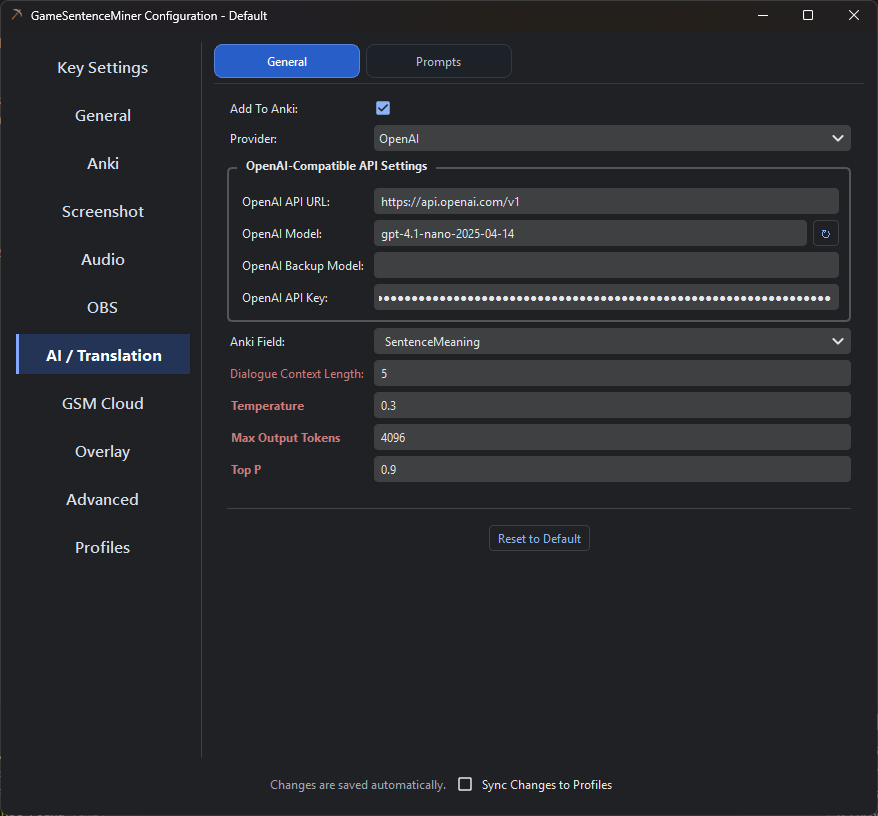
All AI configuration is handled in the AI tab within GSM's settings. You must provide an API key for the service you wish to use.
- Google Gemini
- Groq
- OpenAI / OpenRouter
- Ollama
- Local LLMs (LM Studio, etc.)
Google's Gemini recently underwent a massive downgrade in free tier availability. But some models like gemma-3-27b are still generously supported in free tier, and are good enough for translations.
- Go to Google AI Studio and sign in with your Google account.
- Click Create API Key and copy the generated key.
- Paste this key into the
Gemini API Keyfield in GSM's AI settings.
Recommendations: Honestly, gemma3-27b is the only one worth using right now in terms of free tier. I will update this doc if that changes in the future.
Gemini's free tier has regional availability. Check the official documentation to see if your region is supported.
Groq provides an easy-to-use LLM service with competitive pricing.
- Go to Groq and sign in or create an account.
- Navigate to the API section and generate a new API key.
- Paste this key into the
Groq API Keyfield in GSM's AI settings.
Recommendations:
- meta-llama/llama-4-maverick-17b-128e-instruct: 1000 requests per day, very accurate.
- llama-3.1-8b-instant: 14000 requests per day, fast, and still probably good enough for most translations.
You can use any OpenAI-compatible API endpoint, including OpenAI itself, OpenRouter, or local LLMs.
For OpenAI, you may be able to get free tokens by opting in to sharing your API inputs/outputs at Data Controls -> Sharing -> Share inputs and outputs with OpenAI. I personally have used millions of tokens and haven't been charged a dime. You may have to put in 5 dollars to unlock tier 1 before this becomes available though.
- Obtain your API key from your chosen service.
- Paste it into the
OpenAI API Keyfield. - Set the
OpenAI API URL. This should be the base URL of the API.- OpenAI:
https://api.openai.com/v1 - OpenRouter:
https://openrouter.ai/api/v1
- OpenAI:
Ollama is a great option if you want local models, but it is also a very practical cloud option now. For a lot of people, Ollama Cloud makes more sense than running a big model locally while gaming.
Local Ollama
-
Install Ollama and make sure the Ollama server is running.
-
Pull a model you want to use, for example:
ollama pull qwen3:8b -
In GSM's AI settings, choose Ollama as the provider.
-
Set the
Ollama URLif needed. The default ishttp://localhost:11434. -
Pick your
Ollama Model. GSM also supports an optionalOllama Backup Modelif the primary one fails.
Ollama Cloud
Ollama's official docs now support cloud-hosted models through the same API family. There are two useful ways to think about this:
- Through your local Ollama install: sign in with
ollama signin, then use cloud-enabled models from your local Ollama endpoint. - Direct to Ollama's hosted API: Ollama exposes a hosted API at
https://ollama.com/apifor cloud access.
For GSM users, the easiest path is usually:
- Install Ollama normally.
- Run
ollama signin. - Use a cloud model from your Ollama install.
- Keep GSM pointed at your normal local Ollama URL:
http://localhost:11434.
This is nice because you still use GSM's normal Ollama provider setup, but the heavy model work can be offloaded to Ollama's cloud instead of your gaming PC.
If you want to use Ollama's hosted API directly instead, set the Ollama URL to https://ollama.com and use an Ollama API key for that hosted setup.
Recommendations:
- If you are gaming on the same machine, prefer Ollama Cloud or smaller local models.
- For local use,
qwen3:8bor similar midsize instruction-tuned models are a good balance of speed and quality. - Keep a backup model configured if you frequently swap models around.
Local Ollama does not require an API key. Hosted access on ollama.com does.
According to Ollama's official docs, cloud models can be used through the local Ollama workflow after ollama signin, and Ollama also provides a hosted API at https://ollama.com/api.
For privacy or offline use, you can run an OpenAI-compatible server locally. This requires a separate setup using a tool like LM Studio (which I recommend), Ollama, Jan, or KoboldCpp.
-
In GSM's AI settings, set the
OpenAI API URLto your local server's address (e.g.,http://localhost:1234/v1). -
Set the
OpenAI API Keyto any non-empty value (e.g.,lm-studio). -
For OCR tasks with a local vision model, you must configure it separately. Create or edit the file at
C:/Users/{YOUR_USER}/.config/owocr_config.iniand add a section for your local model:[local_llm_ocr]
url = http://localhost:1234/v1/chat/completions
model = qwen/qwen3-vl-4b-instruct-gguf
keep_warm = True
api_key = lm-studio
;prompt = Extract all Japanese Text from Image. Ignore all Furigana...
Pre-written Prompts
GSM uses pre-written prompts to guide the AI. The context for these prompts is built from the last 10 lines of text received by GSM.
Translation Prompt
This prompt is designed for professional-grade game localization, instructing the AI to provide a natural-sounding translation that preserves the original tone and context.
**Professional Game Localization Task**

**Task Directive:**
Translate ONLY the provided line of game dialogue specified below into natural-sounding, context-aware ENGLISH. The translation must preserve the original tone and intent of the source.

**Output Requirements:**
- Provide only the single, best ENGLISH translation.
- Use expletives if they are natural for the context and enhance the translation's impact, but do not over-exaggerate.
- Carryover all HTML tags present in the original text to HTML tags surrounding their corresponding translated words in the translation. Look for the equivalent word, not the equivalent location. DO NOT CONVERT TO MARKDOWN.
- If there are no HTML tags present in the original text, do not add any in the translation whatsoever.
- Do not include notes, alternatives, explanations, or any other surrounding text. Absolutely nothing but the translated line.

**Line to Translate:**
君の物語は、ここで終わりなのか?
Context Summary Prompt
This prompt asks for a brief summary of the current scene based on the dialogue context.
**Task Directive:**
Provide a very brief summary of the scene in English based on the provided Japanese dialogue and context. Focus on the characters' actions and the immediate situation being described.

**Current Sentence:**
紫「あれ? 八代さんがすごい<b>形相</b>でこっちに……」
Troubleshooting
- OpenAI GPT-5 Models Fail: Newer OpenAI models (like
gpt-5-nano) have deprecated themax_tokensparameter in favor ofmax_completion_tokens. GSM has been updated to handle this, but ensure you are on the latest version if you encounter errors. - No Translation Appears:
- Make sure the
Enabledcheckbox for AI features is ticked in GSM's settings. - Check that your API key and URL are correct.
- Confirm you haven't exceeded the rate limits of your chosen API service.
- Make sure the